Coordinate your first task
In this tutorial you'll run a multi-agent coordinator task end to end, right inside a Cursor chat. You'll ask for a tiny change, approve a small task graph, watch the agents work in waves, and read the final report. By the end you'll know the whole loop — trigger, approve, watch, read — on a change that's guaranteed to succeed.
The example is deliberately trivial: add a friendly comment to the top of your
README.md, built by a two-agent graph (one engineer, one reviewer). Nothing in
your real code is touched.
Before you begin
Finish Getting started first. You need an onboarded
angelo project with the MCP servers running — check Settings → MCP for a
green indicator next to angelo-coordinator.
1. Trigger the coordinator
Open a new chat in your project and paste this prompt:
Use the coordinator to add a one-line welcome comment to the very top of
README.md. Build a two-task graph: an engineer to make the edit and a reviewer
to verify it. Keep it at low rigor.
The word "coordinator" is the trigger. The agent switches into the coordinator protocol, scopes the change, and designs a task graph.
Why this phrasing?
The coordinator skips the graph ceremony for truly trivial one-liners and offers to just do them. Asking explicitly for an engineer + reviewer graph keeps the lesson on the rails so you see the full flow.
Expected result: the agent replies with a proposed task graph instead of editing anything yet.
2. Approve the task graph
The coordinator presents a graph for sign-off. It will look roughly like this:
TASK GRAPH for: "add a welcome comment to README.md" (rigor: low, max 1 extension)

  [eng] engineer: add a welcome comment to the top of README.md (writes: README.md)
  [rev] reviewer: verify the comment was added (after: eng)

  Wave 1: eng
  Wave 2: rev

Approve, or tell me what to change.
Read it top to bottom: two tasks, two waves. The reviewer runs after the
engineer because it depends on the engineer's work. Note the engineer's explicit
writes: README.md — every implementer task declares the paths it will write, so
the coordinator can run engineers with disjoint scopes in parallel.
Reply "Approved" (or "go ahead").
Expected result: the coordinator begins executing — you'll see it claim the engineer task and spawn a subagent.
3. Watch the waves execute
The coordinator runs the graph one wave at a time:
- Wave 1 — the engineer subagent edits
README.mdand reports back with the files it changed. - Wave 2 — only after the engineer finishes, the reviewer subagent inspects
the change blind (it sees the changed files, not the engineer's reasoning) and
returns
PASSorFAIL.
You'll see each subagent appear, do its job, and complete before the next wave starts.
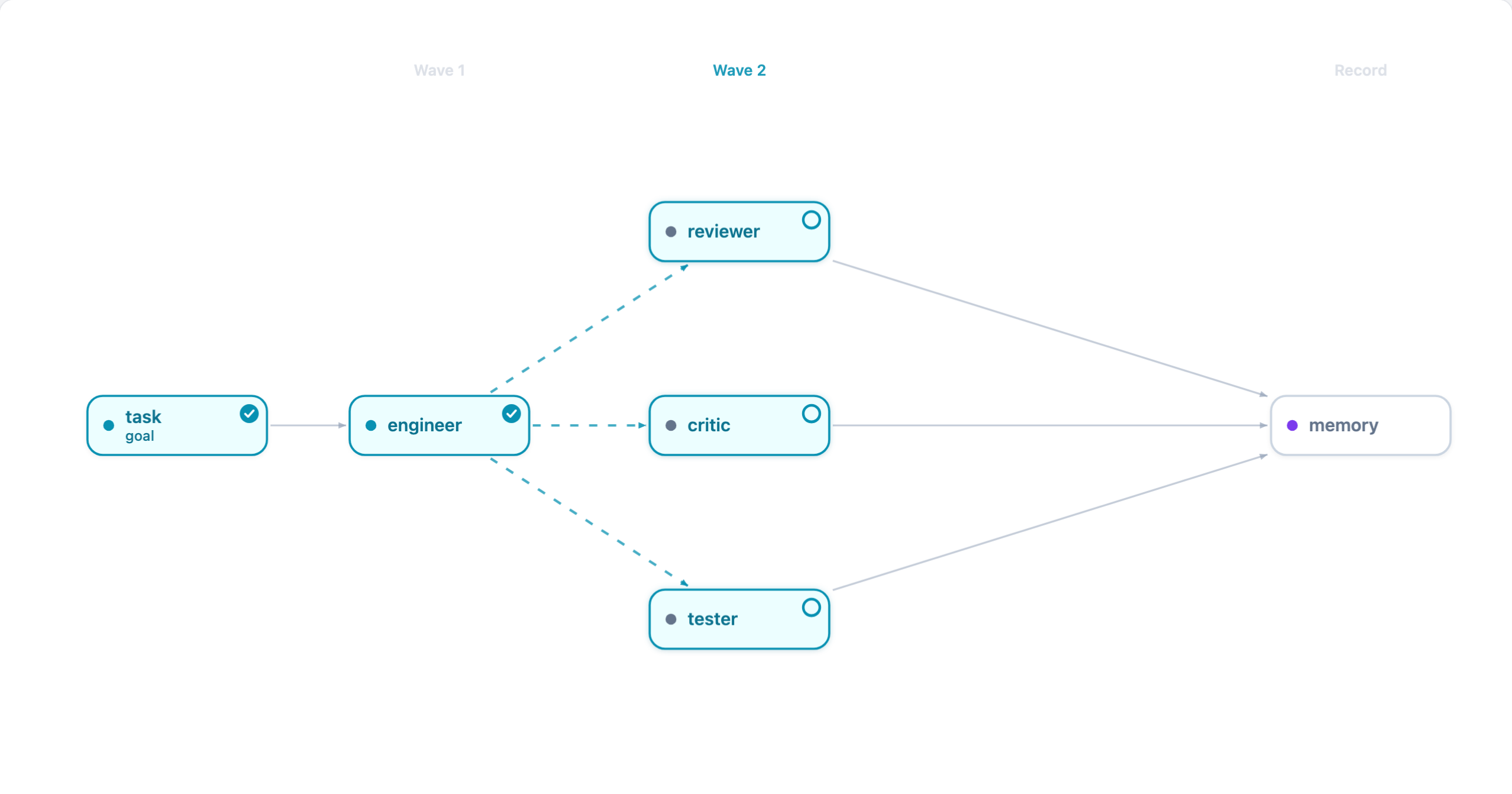
A run mid-flight: Wave 1's engineer has finished (✓) and Wave 2's read-only checkers are running in parallel before the outcome records to memory.
Expected result: both subagents finish; the reviewer returns PASS. Open
README.md and you'll see the new welcome comment at the top.
Watch it visually
The memory dashboard shows runs as they execute. See Use the memory dashboard to open it.
4. Read the final report
When every task is done, the coordinator presents a summary: which tasks ran, their results, any fixes it had to make, and the net change. For this run it's a clean one-pass success — engineer made the edit, reviewer confirmed it.
Expected result: a short report ending with a PASS overall, plus the list
of files changed (README.md).
What you learned
- The coordinator loop: trigger → approve a graph → execute in waves → read the report.
- A task graph is a small DAG of agent tasks; waves are the batches that can run in parallel, with downstream tasks waiting on their dependencies.
- Checkers like the reviewer run after an implementer and verify the work blind.
Next steps
- Understand the design: Explanation → Coordinator.
- See the full agent roster, rigor levels, and failure handling in the coordinator protocol.
- Capture what a run decided so future sessions can recall it: Capture work in memory.